Mar
8
A Short Update on LABs Site Features
For our LABs site, we have added a new comment feature. You can now share your thoughts and engage in discussions by adding comments to all our blog posts.
The comments feature also supports GitHub authentication, allowing you to sign in with your GitHub account and join the conversation seamlessly.
At LABs, we prioritize your privacy, and that’s why we adhere to the principle of “Privacy by Design” when it comes to our comments feature. Rest assured that you have full control over your comments, and no personal data is shared with third parties.
We look forward to seeing your contributions and insights in the comments section!
Feb
18
1.7.1. The Latest Update of PrivateBin: Enhancements and Fixes
Filed Under Announcements | Leave a Comment
Our Paste service has new version of underlaying software – PrivateBin.
For the ones that do not already know the product PrivateBin is a minimalist and open-source online pastebin. PrivateBin follows a zero-knowledge approach, where the server has no knowledge of the content being pasted. The 1.7.1 update brings several enhancements and fixes to improve the functionality and security of the platform. In this blog post, we will explore the key features and improvements introduced in the latest version of PrivateBin.
Key Features and Enhancements:
- Administration Script: The latest update introduces a new script called “administration” that assists with administrative tasks. This script enables users to delete pastes, remove empty pastes, and perform other administrative actions more efficiently.
- Improved S3 Storage: The update includes an improvement for the S3 storage feature. This enhancement ensures smoother and more reliable storage of pastes on Amazon S3, providing users with a seamless experience.
- Library Updates: PrivateBin regularly updates its libraries to maintain security and compatibility. The latest version includes updates to several libraries, ensuring that the platform remains up-to-date with the latest security patches and improvements.
Bug Fixes:
- HTML Entity Double Encoding Issues: The previous release (v1.3.2 & v1.2.2) introduced HTML entity double encoding issues. However, the latest update (v1.7.1) addresses these issues, ensuring that pasted content is displayed correctly without any encoding problems.
- Smaller Issue Fixes: The latest update also includes fixes for various smaller issues reported by users. These fixes enhance the overall stability and performance of PrivateBin, providing a smoother and more reliable pasting experience.
The latest update of PrivateBin (v1.7.1) brings significant enhancements and bug fixes to this minimalist online pastebin. With the introduction of the administration script, improved S3 storage, and various bug fixes, PrivateBin continues to prioritize user privacy and security. Users can enjoy a seamless and secure pasting experience while maintaining complete control over their data.
Remember to visit the https://zerobin.hbcom.info.
Happy pasting!
Feb
3
Introducing the New and Improved hbcom.info Portal Website
Filed Under Announcements | Leave a Comment
We are thrilled to announce the launch of the updated hbcom.info portal website! After months of hard work and dedication, we are delighted to officially unveil the new and improved site.
Our goal with this redesign was to create a user-friendly browsing experience for our trusted and valued visitors. The updated site features a clean, modern design, improved functionality, and easy access to essential information to help you make the most of your online experience.
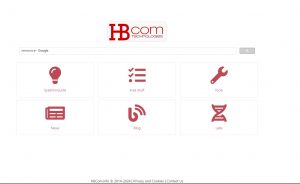 Here are some of the key features and updates you can expect from the new hbcom.info portal website:
Sleek and Intuitive Design
We have revamped the website’s layout to ensure a seamless and intuitive navigation experience. The new design is visually appealing and user-friendly, making it easier for you to find the information you need.
Enhanced Functionality
The updated website boasts enhanced functionality, including improved search capabilities, faster load times, and optimized performance across various devices. Whether you’re accessing the site from a computer, tablet, or smartphone, you can expect a smooth and responsive experience.
Rich Content and Resources
Our commitment to providing valuable and relevant content remains steadfast. The new website is home to a wealth of resources, articles, and insights to keep you informed and engaged. From industry news to helpful guides, there’s something for everyone.
Improved User Experience
We’ve paid special attention to the user experience, ensuring that every visit to hbcom.info is a pleasant and productive one. Whether you’re a returning visitor or a first-time guest, we want you to feel at home on our website.
Stay Connected
Our updated website makes it easier than ever to stay connected with us. From social media links to newsletter subscriptions, you can seamlessly engage with our community and stay updated on the latest developments.
We invite you to explore the new hbcom.info portal website and experience the enhancements firsthand. Your feedback is invaluable to us, so please feel free to share your thoughts as you navigate the site.
Thank you for your continued support, and we look forward to serving you through our updated online platform. Here’s to a new chapter of seamless browsing and enriched digital experiences at hbcom.info!
Dec
8
Zerobin is currently in unmaintained state. Fortunately the community picked up the idea and this is how PrivateBin was created.
It is a fork of ZeroBin, originally developed by Sébastien Sauvage. ZeroBin was refactored to allow easier and cleaner extensions. PrivateBin has many more features than the original ZeroBin.
PrivateBin provides:
-
As a server administrator you don’t have to worry if your users post content that is considered illegal in your country. You have no knowledge of any of the pastes content. If requested or enforced, you can delete any paste from your system.
-
Pastebin-like system to store text documents, code samples, etc.
-
Encryption of data sent to server.
-
Possibility to set a password which is required to read the paste. It further protects a paste and prevents people stumbling upon your paste’s link from being able to read it without the password.
You can create new one or use Updated https://zerobin.hbcom.info.
May
24
With recent concerns about privacy over internet I’va added Terms of Service, Privacy policy and Cookie policy.
Please, review them.
Dec
28
Updated interface project
Filed Under Announcements | Leave a Comment
First – Happy holidays to all of you.
New Year is coming and this calls for news.
The news we prepared for you is about new project on reorganization on the content and update of the interface of provided services.
As first step of the process we are proud to present first BETA version of HBCom portal.
Some of the highlights:
- It has improved user interface
- It uses new and improved web technologies
- It will be a base for new services
We are expecting your feedback via comments on this post or feedback form on the portal.
Apr
25
From several years my home router is Asus WL-520GC. Even manufacturer firmware is good enough for everyday users I did flash the router with DD-WRT firmware. How to do that is well explained in the dd-wrt wiki.
After upgrading my Internet connection speed I’ve noticed that I can reach maximum speed only from wired network and WiFi is maxed at 6Mbs and ping is with 5ms more than wired connection.
Ping increase looks logical since packets are encrypted and traveling over air. What puzzled me was the decrease in speed.
Initially I suspected my laptop (C-60 CPU is not most powerful one), but test results were the same from much more powerful PC.
Next step was to update all Windows drivers – unfortunately without noticeable result. As riding on update wave it was logical to upgrade also dd-wrt firmware from 13084 to latest recommended 14896 (at moment of writing this post). Main reason for that was multiple forum posts that build 13084 had problems. Unfortunately subsequent tests did not show increase in WiFi speed.
So back to reading and testing. Several forum posts suggested changing WiFi advanced setting. To cut long story short here are settings I did have success with:
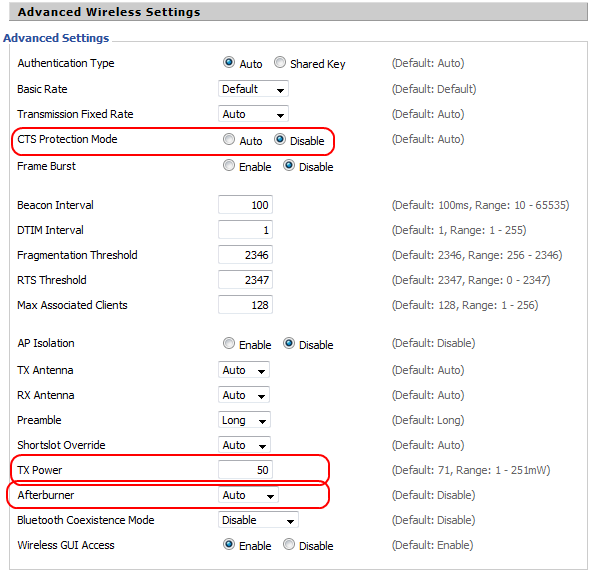
DD-WRT Advanced Wireless Settings
CTS Protection Mode – > Disable
TX power -> 50
Afterburner -> Auto
In addition I did basic WiFi survey to determine how channels were used in my area and set least used one.
Here is the result:
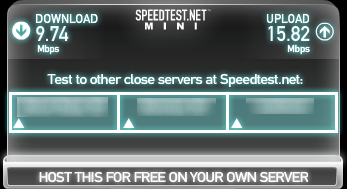
If you have comments or suggestions on how to improve the speed even more, please share in the comments.
Mar
22
Zerobin service is updated to version 0.19.
As a reminder for those wondering what is this:
ZeroBin is a minimalist, opensource online pastebin/discussion board where the server has zero knowledge of hosted data. Data is encrypted/decrypted in the browser using 256 bits AES.
Here are the updates from previous version (0.18)
- Corrected XSS security flaw which affected IE<10. Other browsers were not affected.
- Corrected spacing display in IE<10.
Aug
31
Mute Screamer uses PHPIDS to detect attacks on your WordPress site and react in a way that you choose.
If you have too many intrusions in you Mute Screamer log (v 1.0.7 at time of writing) removing them via Admin (web) interface could be time consuming.
Faster is to do that directly on the database.
Just execute this SQL command (MySQL in this example) on your WorPress database:
TRUNCATE TABLE 'PREFIX_mscr_intrusions'
NOTE: “mscr_intrusions” is default table name and PREFIX is your WordPress prefix you set on installation, please replace with correct value. if you do not have that table you can look for the name at line 53 in mute-screamer.php.
I will be glad to see clean all button in one of next versions.
Aug
31
Since version 2.0 of VLC a lot of changes were made in the code of this popular media player.
Something annoying was the increase of CPU usage when playing audio files. From almost 0% to 10-20%.
On powerful system this increase is almost unnoticeable, but on Intel Atom or AMD C60 you can notice the difference.
The fix is really easy.
Shutdown VLC and just erase/rename following 2 files from VLC folder (in my case C:\Program Files (x86)\VideoLAN\VLC\plugins\codec):
- libsamplerate_plugin.dll
- libspeex_resampler_plugin.dll
And this is all. CPU usage is back to normal.
I did not notice any problems for now.
Finally I can use again VLC on all my systems.
You must be logged in to post a comment.