Jun
23
find tips and tricks
Filed Under Howto, Linux | Leave a Comment
find is LINUX/UNIX command to find files in file system.
Here you will find few tricks:
find ~ -type f mtime 0
Will show all files in your home folder created today.
find ~ -type f mtime 0 -iname '*.mp3'
Will narrow the search to .mp3 files only and iname is not case sensitive.
And if you want to search for files that are not belonging to you use:
find ~ ! -user ${USER}
Lot more options you can find in find man page
man find
May
15
All new computers do not have FDD (Floppy Disk Drive) and even you find one it could be rally hard to find good media.
As remedy to this you could still boot from a CD
But sometimes you even do not have CD/DVD drive.
And then you need to boot from floppy to update your BIOS.
So what to do?
Do not run to your basement looking for floppies. There is another way. You can use grub and syslinux.
First you need Linux installed (OR probably you already have it). Examples here are for Ubuntu.
Next step is to install needed software:
sudo aptitude install syslinux
Then download a floppy image:
http://www.allbootdisks.com/downloads/Disks/MS-DOS_Boot_Disk_Download47/Diskette%20Images/Dos6.22.img
Then mount the image:
sudo mount Dos6.22.img /mnt -o loop
You can remove everything except:
- autoexec.bat
- command.com
- config.sys
- himem.sys
- io.sys
- mscdex.exe
- msdos.sys
After that in case of upgrading BIOS you need to copy new bios file and flash program.
Finally we will prepare the boot image.
sudo cp /usr/lib/syslinux/memdisk /boot/

sudo cp Dos6.22.img /boot/
Reboot and on grub screen press c and boot the image using:
root (hd0,0)

kernel memdisk

initrd Dos6.22.img
Mar
27
Fix Hibernate in Windows XP part 2
Filed Under Fix, Howto, Windows | Leave a Comment
Hibernate shortcuts
As addition to Fix Hibernate in Windows XP here is additional shortcut I discovered.
To activate hibernate option I had to press <shift> every time I go to shutdown menu, but once I did not and it worked…
So here is the full shortcut:
<WinKey> -> <U> -> <H>
What that means?
– Start menu
– Shutdown
– Hibernate
Jan
7
Upgrade to 2.9.1
Filed Under Uncategorized | Leave a Comment
As from the previous post if you see nay problems, please let me know.
This time the upgrade was almost flawless, except the quirk that if I did not disable and after that re enable all plugins I get 500 server error?!
Dec
24
Upgraded to WP 2.9.0
Filed Under Announcements, Project | Leave a Comment
Finally finished the upgrade – sorry for any inconvenience it toke me a bit more time.
As usual on major release there is new requirement so be sure to check them before upgrading.
I proceeded as usual – following instructions from wordpress web site, but on the last step (database upgrade) I was surprised with message that my DB version is not supported in new version.
So I had to create new one and upload all SQL data from the backup (you have one of course) happily I was able to do it without any modifications.
If you’ve noticed any quirks, please let me know.
Sep
26
Fix Hibernate in Windows XP
Filed Under Fix, Howto, Windows | Leave a Comment
Usually in Windows XP when you click Start -> Turn off Computer you have following options:
- Stand by
- Turn off
- Restart
But there is another option called Hibernate. As name suggests when you choose that option your computer goes in deep sleep. This is different from Stand by mode and Shutdown and actually is in between.
In that mode Windows XP does the same as Stand by, but in addition writes memory dump on the hard drive and turns off the PC.
After you power up the PC the memory dump is loaded in the memory and computer resumes operation as after stand by.
It takes a bit more time for that operation, but is much less hat initial power up.
How to enable Hibernate?
- Make sure that you are logged in with administrator account. You can do that by going in Start -> Control Panel -> User account
- Go to Power Options and choose Hibernate tab
- Check Enable hibernation
- Now you are able to hibernate your computer
Troubleshooting:
- I do not have hibernate icon
If on turn off menu you do not have hibernate icon it means that you have newer computer BIOS that supports Stand by by lower power option.
If you want to hibernate you need to press Shift button until hibernate icon appears.
Sep
10
How to disable VLC Media player system tray popup (updated for v 2.x)
Filed Under Fix, Howto, Linux, Windows | 58 Comments
Sometimes is annoying having all this popups when VLC is minimized and track changes.
Here is how to disable them (for version 1.x):
Go to Tools-> Preferences -> All -> Interfaces -> Main Interfaces -> Qt
and uncheck Notify on track change.
And since interface changed in new version (For version 2.x)
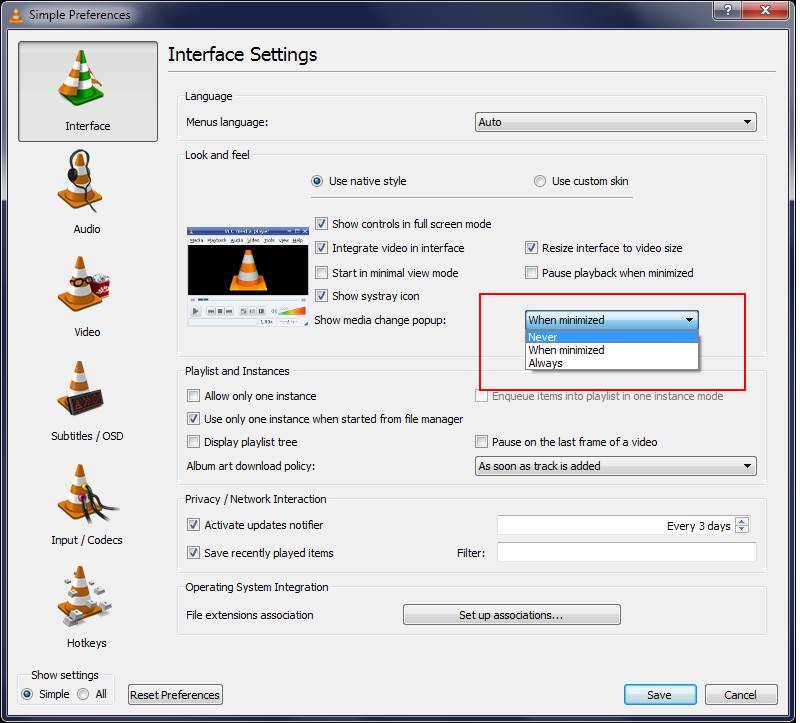
Go to Tools-> Preferences -> Interface -> Show media change popup
and change to Never
Here is a screenshot for reference:
Added by request(Trevor):
If you want to remove systray icon just above there is the setting “Show Systray Icon”. Uncheck it to remove icon from systray.
Aug
8
Acrobat and arrow keys (fix)
Filed Under Fix, Howto | Leave a Comment
For long time I was frustrated form inability to use arrow keys in Adobe acrobat reader to move up and down the page.
Instead of that the cursor was moving in the text.
Finally I realized that this is used to select text. And surprisingly enough I was in Select mode.
Right click and change to Hand tool and I now have the desired behavior.
Hope this will help someone.
Jul
19
My old site
Filed Under Announcements | Leave a Comment
Yahoo is closing geocities – Sad news… a lot of information will be lost in time 😥
This forced me to backup all data to this site.
In case someone is interested here is the link.
Apr
18
Administrative….
Filed Under Announcements | Leave a Comment
Trackbacks temporary disabled.
You must be logged in to post a comment.